
Packages determine what members can book, how many sessions they have available, and in many cases how they are charged. Whether a member is attending group classes, personal training sessions, open gym visits, or another service, their package controls their access and booking experience.
Because packages sit at the centre of the member journey, understanding how they work is essential when setting up your Octiv account.
Package Details
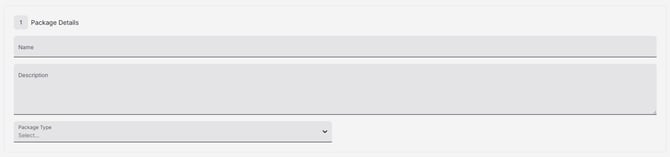
Package Name
The name of the package as it appears to both staff and members throughout Octiv.
Package Description
The Package Description is visible to both staff and members and provides additional information that is not included in the package name, price, or session count.
This may include validity periods, booking restrictions, access limitations, or special terms and conditions.
Example:
Valid for 3 months from the date of purchase. Can only be used for Group Fitness classes.
Package Type
Octiv offers four package types to support different business models and membership structures.
Package Pricing & Period
Top-Up
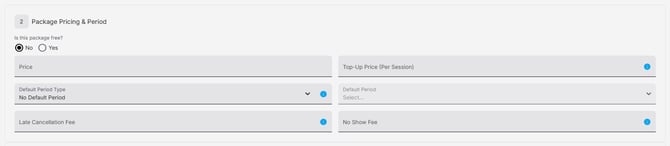
A Top-Up allows members to purchase additional sessions once they have used all sessions included in their package.
Leaving the Top-Up Price blank disables this feature.
Default Period
The Default Period determines when a package will expire. Octiv calculates the expiry date by adding the selected number of weeks or months to the purchase date.
If no Default Period is selected, the package will not expire and will remain active until all sessions are used or the package is manually ended.
Late Cancellation/ No Show Fee
Optional charges applied when a member cancels a booking after the cancellation threshold or fails to attend a booked session.
These fields can be left blank if not required. Regardless of configuration, the booked session is forfeited.
No Show Fees are only applied when a staff member marks a booking as a No Show.
Purchase Limits

Total Purchase Limit
Determines the total number of times a package can be purchased across the facility. Once the limit is reached, the package is marked as Sold Out and is no longer available for purchase.
Purchases Per User
Determines how many times an individual member can purchase a package. Once the limit is reached, the package is marked as Sold Out for that member.
Note: Purchase limits are lifetime limits and do not reset. Leaving either field blank means no limit will be applied.
Package Visibility
Package Category
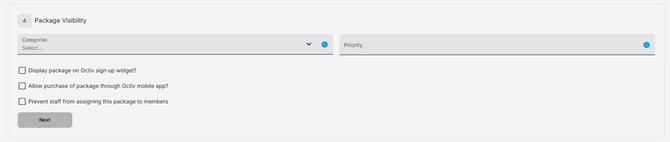
Used to organise and group similar packages. Once created, categories are available for selection when creating or editing a package. Packages can be left uncategorised if a category is not required.
Priority
Controls the order in which packages are displayed throughout Octiv.
By default, packages are sorted by creation date. Assigning a priority allows you to reorder them.
Example:
Priority 1 appears first, 2 appears second, and 3 appears third. etc